

Interface updates will arrive soon for the Institutions and Project Setup workflows in Collect Earth Online (CEO)! The new design provides a cleaner, more intuitive experience, surfacing information right when you need it to manage your institutions and projects effectively.
Among the updates, we hope you notice:
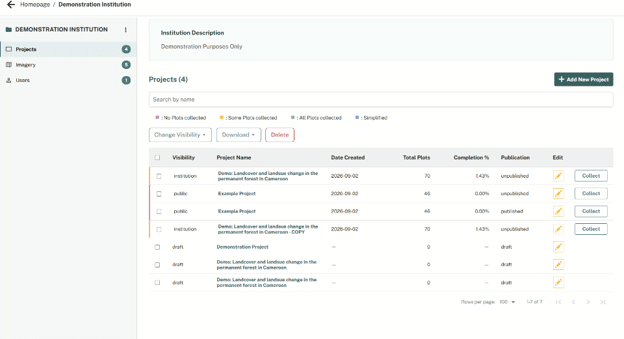
All of your projects in a single table: Now you can easily view project information, including % completed, and total plots.

Quick sorting for easy management: Click table headers to instantly sort your projects by name, completion, or date created.

Easy project search: Easily find a single project or group of projects by searching by Project Name.

Bulk actions made easy: Select as many projects as you’d like, and download project data, update project visibility, or delete – all in one place!

In addition to a new interface, there are a number of useful updates to help you set up your projects.
Start with three simple options: To simplify the workflow and create clarity, the first step in your project setup is to either create a brand-new project, use a template, or import from Collect Earth.

Realtime previews: You can now see previews for imagery, plots, and samples – right within the setup wizard! This helps expedite your workflow, and ensure your project meets your needs from the start.

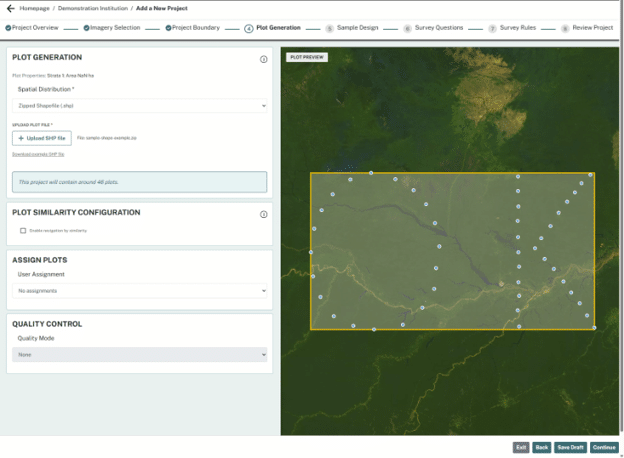 Review before publishing: CEO’s new layout still lets you review your project before publishing, access the QAQC and Project Dashboards, configure the Geo-Dash, export your data, and create a DOI. You can also still easily edit published projects, including adding more plots, new questions, or copy the entire project.

All the tools and features you rely on are still here. This update does not remove or alter any functions. You can continue creating and editing projects just as you could before.
A well-designed and thoughtful interface can make your work more efficient and enjoyable. These updates are part of our ongoing commitment to improve the user experience, while maintaining the key functionality of the platform.
This is just the beginning of the updates for Collect Earth Online! Stay tuned for more updates to CEO’s splash page!
For suggestions and help, contact us at: support@collect.earth.
Q: Will I lose data for my current or older projects?
A: No! All projects and any associated data collected for those projects will remain the same! All of the changes are purely aesthetic or feature enhancements.
Q: Are you taking away any existing features?
A: No! All of CEO’s existing features will remain the same. We are only adding new features which we hope to improve quality of life when using the application.
Q: Are there new features?
A: Yes! We have a number of new features to make using CEO easier. This will include:
Q: Who should I reach out to for help or to provide suggestions?
A: You can reach the CEO development team via email: support@collect.earth.
Q: Are you planning other additional changes to CEO?
A: Yes! We are actively developing new features to improve CEO and make it easier and better for all of our users. If you want to share feedback or ideas, please email support@collect.earth.
Q: Will CEO still be free to use?
A: Yes! We recognize that CEO is a valuable tool for a multitude of important initiatives, and we remain committed to keeping the tool free and open source.
Have more questions? Email support@collect.earth!