

We’re thrilled to share a refreshed look for data collection in Collect Earth Online (CEO)! The new design brings a cleaner, more intuitive experience to your workflow, making it easier to focus on what matters most: collecting high-quality data.
Look for the refreshed interface later in September 2026. This update improves usability while keeping all the core functionality you already know and trust. Stay tuned for more details!
Among the updates, we hope you notice:
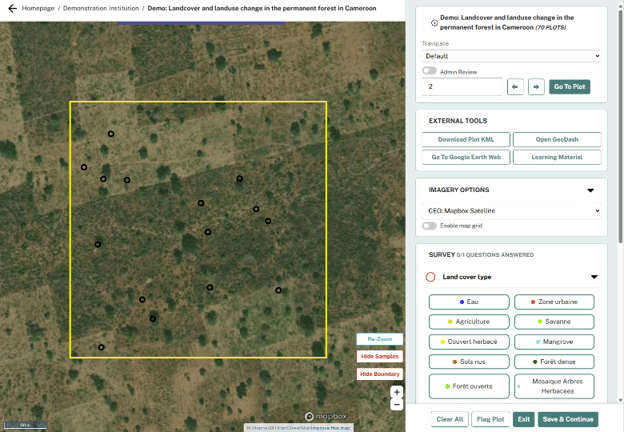
These updates are designed to simplify your workflow and reduce distractions. Now, tools and options show up right where you need them, so you can spend less time searching and more time collecting data.
Easy navigation: Quickly navigate between a project and the parent institution, without having to return to CEO’s homepage first. Breadcrumb navigation makes it easy!

Map functions in context: Key tools including Re-Zoom, Hide Samples, and Hide Boundary have moved off of the External Tools menu and are now built directly into the map, reducing clutter and providing quick access while collecting data.
Cleaner Data Collection start: Imagery options and survey questions appear only after you click “Start Collecting Data”, reducing visual clutter and preventing large, unnecessary imagery loads.
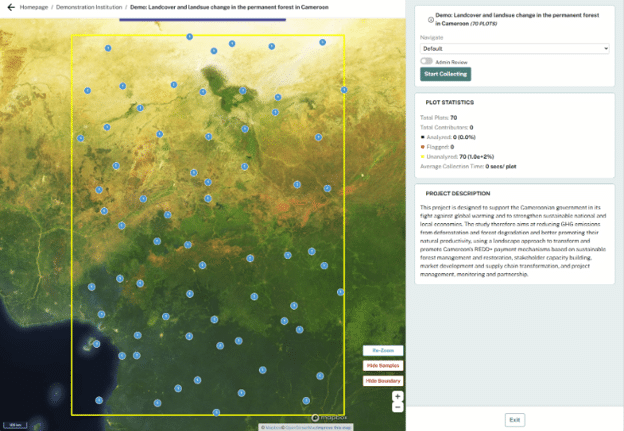
Collecting data just got easier. You can now observe your progress at a glance and see drawing tools and answering survey questions at the same time—no more tedious clicking back and forth.
Survey Questions List: Survey questions are now displayed in a collapsible list, with arrows to expand or close each question, instead of on separate cards. The first question is expanded for you to jump right into data collection, and children question automatically appear right when you need them.
Updated Visual Indicators: Progress indicators show how many questions remain, and visual cues show you which questions you have answered, and which you still need to complete.
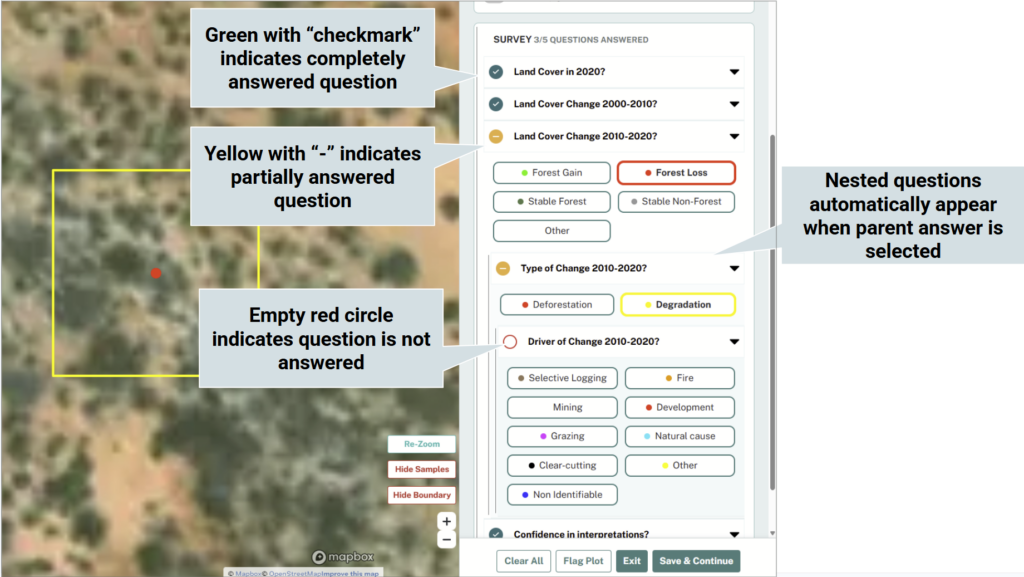
Expedited Workflow: For questions that have a typed-in response, you can use the “Enter” and “Tab” keys to move more quickly through the survey.
Sample Drawing Tool: When enabled, the Sample Drawing tool appears in its own section, so you no longer need to switch back and forth between drawing and answering questions. Simply draw your sample shape and go!
All the tools and features you rely on are still here. This update does not remove or alter any functions—you can continue collecting and reviewing submitting data exactly as before.
A well-designed and thoughtful interface can make your work more efficient and enjoyable. These updates are part of our ongoing commitment to improve the user experience, while maintaining the key functionality of the platform.
This is just the beginning of the updates for Collect Earth Online! Stay tuned for more updates to interface and workflows!
For suggestions and help, contact us at: support@collect.earth
Q: Will I lose data for my current or older projects?
A: No! All projects and any associated data collected for those projects will remain the same! All of the changes are purely aesthetic or feature enhancements.
Q: Are you taking away any existing features?
A: No! All of CEO’s existing features will remain the same. We are only adding new features which we hope to improve quality of life when using the application.
Q: Are there new features?
A: Yes! We have a number of new features to make using CEO easier. This will include:
Q: Who should I reach out to for help or to provide suggestions?
A: You can reach the CEO development team via email: support@collect.earth.
Q: Are you planning other additional changes to CEO?
A: Yes! We are actively developing new features to improve CEO and make it easier and better for all of our users. If you want to share feedback or ideas, please email support@collect.earth.
Q: Will CEO still be free to use?
A: Yes! We recognize that CEO is a valuable tool for a multitude of important initiatives, and we remain committed to keeping the tool free and open source.
Have more questions? Email support@collect.earth!