
Dynamic World now available in Collect Earth Online

Dynamic World now available in Collect Earth Online

Collect Earth Online can now easily connect to the Dynamic World dataset as basemap imagery and as a Geo-Dash widget. Dynamic World enables CEO users to track land-use change at speeds that conventional land-cover products cannot match.

❔ What Is Dynamic World?

Dynamic World is a near–real-time global land-cover dataset developed jointly by Google and World Resources Institute (WRI). It uses deep learning applied to Sentinel-2 imagery to produce 10-meter resolution land-cover maps that update every 2–5 days, depending on location.

  • Nine land-cover classes: including water, trees, grass, crops, shrub & scrub, flooded vegetation, built-up areas, bare ground, and snow & ice.
  • Per-pixel probabilities: Instead of providing a single categorical class per pixel, Dynamic World generates per-class probabilities, enabling more nuanced analysis and uncertainty understanding.
  • Near real-time: Enables rapid monitoring of landscape change, disaster events, cropping cycles, deforestation, and other dynamic processes.
  • Global coverage: Fully global since 2015 and continuously updated with each new Sentinel-2 overpass.
  • Open and accessible: Freely available through Google Earth Engine and based on peer-reviewed research.
Examples of Sentinel-2 imagery (RGB) and corresponding Dynamic World NRT products for April 2021. Location coordinates reported for image centroid. (a) Brazil, ee.Image(‘GOOGLE/DYNAMICWORLD/V1/20210405T134209_20210405T134208_T22KCA’) and corresponding Dynamic World labels. (b) Poland, zoomed view of ee.Image(‘GOOGLE/DYNAMICWORLD/V1/20210402T095029_20210402T095027_T34UDD’) and corresponding Dynamic World product with a hillshade on the Top-1 confidence class applied to the categorical labels, revealing features not normally visible with discrete valued LULC maps. From Brown et al., 2022

🤝 How Dynamic World Enhances the Collect Earth Online Experience

Integrating Dynamic World into Collect Earth Online can support data interpretation by adding consistency and analytical depth to land-cover interpretation.

  • More timely context: With updates every 2–5 days, Dynamic World gives interpreters a near-real-time view of landscape change, supporting analysis of disturbances, agricultural cycles, and ecosystem dynamics.
  • Stronger interpretation through probabilities: Per-class probability layers help clarify ambiguous areas (e.g., trees vs. shrubs, water vs. crops), improving confidence without replacing expert judgment.
  • Improved monitoring and early warning: Dynamic World helps users quickly identify and prioritize areas of change, strengthening monitoring systems and supporting faster, evidence-based decisions.
  • An additional layer for cross-validation: Dynamic World provides an independent, model-based perspective that allows interpreters to cross-validate their assessments—particularly in complex or transitional landscapes.

Dynamic World data does not replace human interpretation—but it accelerates and strengthens it.

🧭 Using Dynamic World as basemap imagery

Collect Earth Online now has Dynamic World available as platform imagery for use by all CEO users. Leveraging Google Earth Engine, CEO accesses the Dynamic World V1 dataset directly.

There are two ways Administrators can add Dynamic World as basemap imagery. First, there is a default Dynamic World Platform Imagery option that can be added to any project during Imagery Selection.
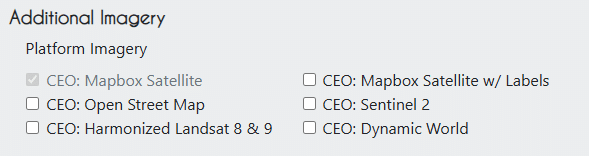
Dynamic World platform imagery option.

Second, you can add a more customized Dynamic World imagery to your Institutional Imagery. For this option, simply go to your Institution’s Page and select the Imagery tab. Click Add Imagery, then select Dynamic World as the option.

You can select a start and end date. The earliest start date possible is 2015-06-27 (June 27, 2015). The latest start date is the current day.

Using the visualization parameters, you can show the most likely class for each pixel (the “label” band) or the probability of any specific class using that class’ band.

Here’s one example for the label band:

{
"bands": ["label"],
"min": 0,
"max": 8,
"palette": ["419bdf", "397d49", "88b053", "7a87c6", "e49635", "dfc35a", "c4281b", "a59b8f", "b39fe1"]
}
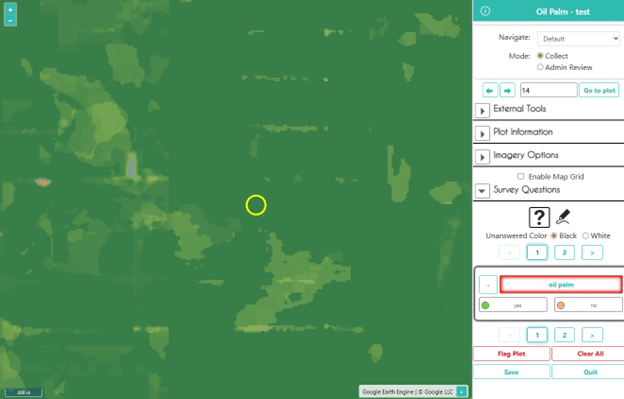
Using the Label band to collect data.

And one to show the probability of trees:

{
"bands": ["trees"],
"min": 0,
"max": 1,
"palette": ["ffffff", "397d49"]
}
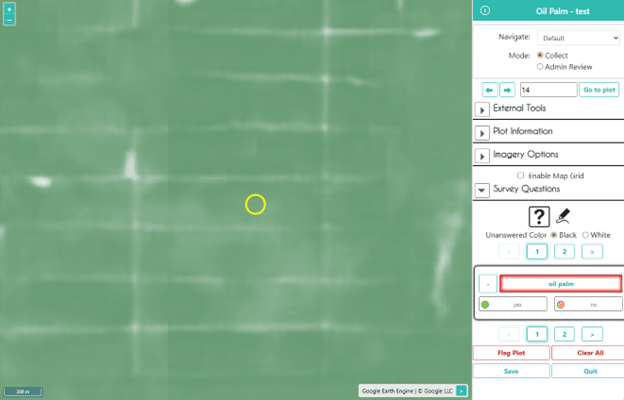
Using the Tree probability band to collect data.

⭐ Using Dynamic world in the Geo-Dash

Collect Earth Online also makes it easy to create a Dynamic World widget in the Geo-Dash. The new Dynamic World widget allows for easy integration of Dynamic World’s land cover classification into your workflow. 

New Dynamic World Widget

To set up the widget, simply add a Title, select the Date Range, and add your Image Parameters as you did with the Imagery.
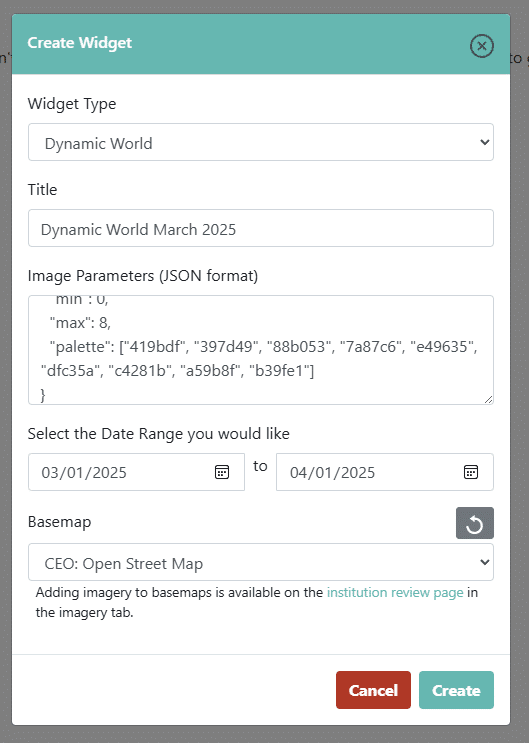
Using multiple widgets allows you to set up side by side comparisons for different time periods or land cover classification probabilities.
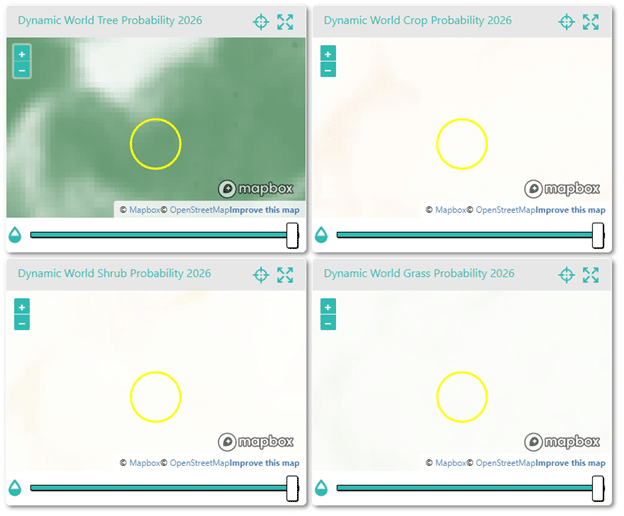
Multiple probability widgets in the Geo-Dash.

Dynamic World and the Time Series Widget

You can also use the Time Series widget to add custom time series graphs, plotting the probability of any one land cover class from 0 to 1 or the most likely land cover class with the “labels” band (represented by their numerical label).
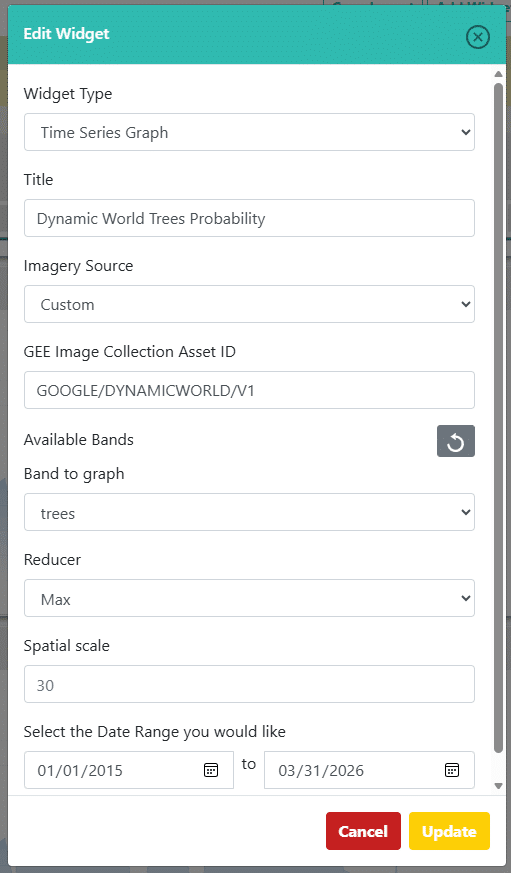
Geo-Dash time series widget filled out for Dynamic World.

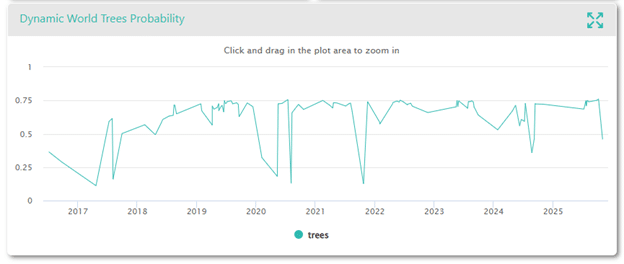
Tree probability graphed over time:

Geo-Dash time series for Tree class probability.

Label (most likely class) plotted over time:
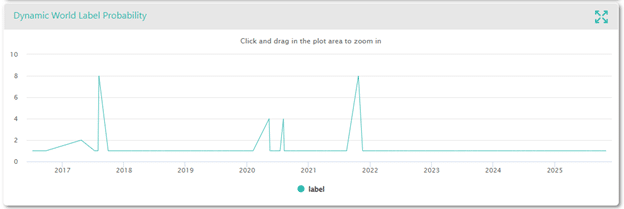
Geo-Dash time series for most likely class probability (Label band).

Using the label band, we can see that the plot is mostly classified as 1 (trees) but occasionally as 2 (grass), 4 (crops) or 8 (snow and ice), likely due to cloud cover.

Integrating Dynamic World into Collect Earth Online can strengthen both data quality and workflow efficiency. We hope this new feature is useful to you.